
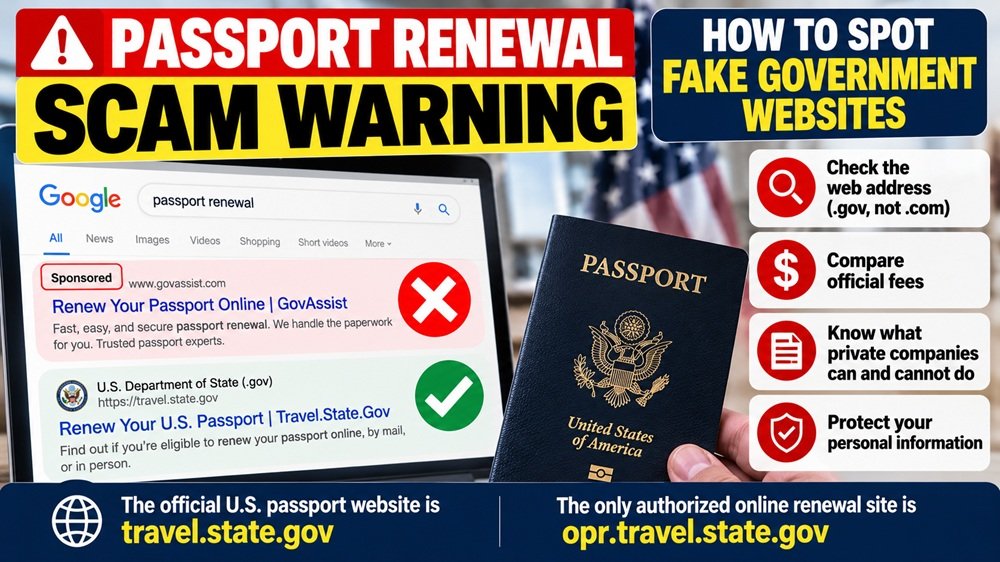
If you search Google for “passport renewal,” “renew passport online,” or “apply for a passport,” don’t assume the first result belongs to the U.S. government.
Paid search advertisements can appear above ordinary search results, and a private company’s website can look surprisingly official. It may use government-style colors, seals, words such as “Gov,” or language that makes an application service seem connected to the federal government.
A new Federal Trade Commission lawsuit shows why that matters.
On October 22, 2026, the FTC sued GovAssist LLC, Entry LLC, and owner Scott Zuckerman, alleging that paid Google search ads and related websites led consumers seeking passport services to believe they were dealing with the federal government or an authorized government-affiliated provider.
The allegations have not yet been decided by a court. But for consumers, the broader lesson is already useful: a Sponsored result is an advertisement, not proof that a website is an official government service.
A passport website can look official without being the government
According to the FTC complaint, consumers searching phrases such as “passport renewal,” “apply for a new passport,” and “passport renewal online” could encounter paid ads for private websites near the top of their search results.
The FTC alleges that websites associated with the defendants included GovAssist.com, Entry.com, and IVS.us and that consumers were led to believe they were dealing with the U.S. government or an authorized passport provider.
That is especially important because passport applications involve extremely sensitive information, which can include:
- Your full legal name
- Date and place of birth
- Social Security number
- Home address
- Existing passport information
- Digital passport photo
- Credit or debit card information
Before entering any of that information, verify exactly who operates the website.
The safest clue is the web address, not the design
The U.S. Department of State gives consumers a very simple rule for online passport renewal:
The only official authorized website for online U.S. passport renewal is a federal government website.
The State Department specifically warns that websites ending in .com, .us, or .org may be private businesses even when they look official.
For eligible online renewals, the official application is accessed through:
opr.travel.state.gov
The important part is the ending: .gov.
The State Department even warns that having the word “Gov” in a company’s name does not make that company authorized to accept or process an online passport renewal.
So instead of asking, “Does this page look governmental?” ask:
“What is the exact domain name in my browser?”
Sponsored does not mean government-approved
A “Sponsored” label usually means the advertiser paid for placement in the search results.
It does not mean that Google, the State Department, or another federal agency has certified that company as the official passport application service.
That distinction is easy to miss when you are in a hurry to renew an expired passport.
A safer search routine is:
- Look past the advertisement label.
- Read the actual website address before clicking.
- Confirm that the passport service is on a .gov domain.
- If uncertain, go directly to travel.state.gov instead of using the search result.
Typing the known government address directly into your browser can remove much of the ambiguity created by search advertising.
Check the official passport fee before paying anyone
Price is another useful warning sign.
Private passport-assistance websites may charge their own service fee in addition to the actual government passport fee.
For example, the State Department currently lists the basic application fee for an eligible adult passport-book renewal as $130. An adult applying for the first time with Form DS-11 currently pays a $130 application fee plus a $35 acceptance-facility fee.
Optional services, such as expedited processing or faster return delivery, can add official charges.
Before paying a website, compare the amount with the State Department’s official Passport Fee Calculator.
If a private company is charging an additional service fee, that does not automatically make the service fraudulent. But the company should clearly disclose that it is a private business and that its fee is separate from the government passport fee.
A private company cannot submit your online renewal for you
This is one of the easiest facts to use when evaluating an online passport service.
The State Department says that if you qualify to renew your passport online, you must complete your own online application.
No third-party company can sign and submit the official online passport renewal application on your behalf.
So if a site suggests that paying the company means it will complete the actual federal online renewal process for you, stop and verify what service you are really purchasing.
You may only be paying the company to help prepare information that is available through the government’s own application system.
Don’t assume paying a private site means your passport application was submitted
This can create a particularly expensive misunderstanding.
A consumer might enter personal information, pay a private website, and believe the passport renewal is finished.
But the State Department warns that third-party websites may charge consumers for services such as filling out passport forms while leaving them confused about whether an official application has actually been submitted.
You may then discover that you still need to:
- Submit an official passport application
- Pay the actual U.S. Department of State fee
- Provide required identification or citizenship evidence
- Submit an approved passport photo
Before paying, make sure you understand exactly what the company is selling and what you will still need to do afterward.
Be suspicious of promises to get a passport much faster
Private services also cannot create their own special passport-processing lane inside the federal government.
The State Department controls the passport application process and provides official options for routine, expedited, and urgent travel situations.
If you have urgent international travel, use the State Department’s official passport-agency instructions rather than assuming a search advertiser can obtain special government treatment.
For qualifying travelers, passport agencies and centers handle urgent international travel through the government’s appointment system.
Paying an outside company does not create a new federal processing category.
Use this 30-second check before entering personal information
Before typing your Social Security number, passport number, or payment information into a passport website, stop and check:
- Is the website actually .gov?
- Does the browser show travel.state.gov or another legitimate government subdomain?
- Is the search result marked Sponsored?
- Does the company clearly say it is a private service?
- Are you paying a private service fee in addition to the official government fee?
- Does the price match what the State Department’s fee calculator shows?
- Is the site promising that it can submit your official online renewal for you?
If something doesn’t make sense, close the page and start again directly at travel.state.gov.
What if you already paid a private passport website?
First, determine what happened.
If you knowingly purchased an optional service from a private company, review the company’s terms and refund policy.
If you believed you were dealing with the U.S. government because of deceptive statements or website presentation, keep records of what you saw.
Save:
- Screenshots of the advertisement and website
- Your receipt
- Emails and text messages
- The exact web address
- Credit-card or bank records
You can report deceptive government-impersonation activity to the Federal Trade Commission at ReportFraud.ftc.gov.
The State Department notes that it generally cannot intervene in disputes between consumers and unauthorized private passport-service companies or refund money those companies charged.
What if you gave the site your Social Security number?
This deserves more attention than simply requesting a refund.
If you believe sensitive personal information may have been compromised, the State Department directs consumers to IdentityTheft.gov for identity-theft assistance.
Depending on what information was exposed and what happened afterward, your response may include:
- Changing compromised passwords
- Watching bank and credit-card accounts
- Checking your credit reports
- Considering a credit freeze
- Reporting actual identity theft through IdentityTheft.gov
Do not assume that canceling a credit-card payment also protects the personal information you already entered.
The SavingQueen takeaway
The most useful lesson from the FTC’s new passport-services case is not the name of one company.
It is a search habit.
When you need a government service, don’t automatically trust the first result on Google.
Search ad → Check domain → Confirm .gov → Check official fee → Then enter personal information.
For U.S. passports, start directly at travel.state.gov. If you qualify for online renewal, the State Department says the authorized online renewal system is accessed through opr.travel.state.gov.
A polished website, the word “Gov,” a high review score, or the top position in a search result does not turn a private company into a federal agency.
Checking the address bar before entering your Social Security number may take five seconds. In this situation, those five seconds can save both money and a much larger identity-theft problem.
FTC action: October 22, 2026
Case status: Pending; FTC allegations have not been decided by the court
Official passport information: travel.state.gov
Official online renewal: opr.travel.state.gov
Fraud reports: ReportFraud.ftc.gov
Identity-theft recovery: IdentityTheft.gov