
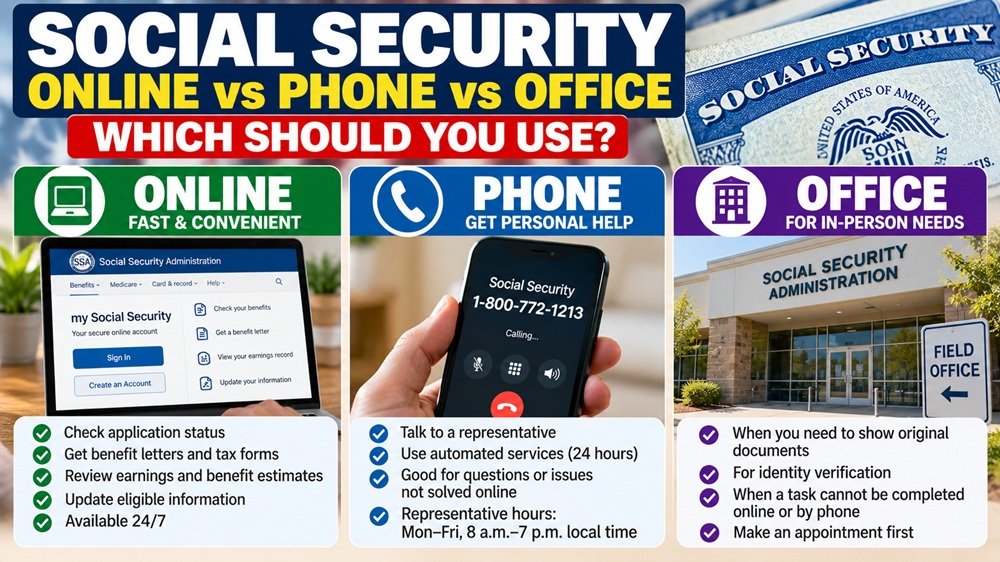
If you need something from Social Security, your first instinct may be to call the 800 number or drive to the nearest office.
But for many routine tasks, neither may be the fastest choice anymore.
The Social Security Administration, or SSA, says its website and personal my Social Security accounts are now available 24 hours a day, seven days a week. Many common tasks—including checking an application, getting a benefit verification letter, reviewing your earnings history, and changing certain benefit information—can be handled without waiting on the phone or visiting an office.
The key is knowing which channel fits your particular problem.
A simple rule: Online first, phone second, office when necessary
For most people, a useful starting order is:
Routine account task → Try online
Online won’t solve it → Call Social Security
Identity, original documents, or required in-person step → Make an office appointment
This does not mean every case follows that exact order. Certain benefit types, identity-verification issues, and complicated claims may require a different path.
But checking the online option first can save a trip that turns out not to be necessary.
Use my Social Security for routine account tasks
A personal my Social Security account is the best starting point for many everyday requests.
If you are not yet receiving Social Security benefits, your account can generally help you:
- View your Social Security Statement
- Review your earnings history
- See estimates of future retirement benefits
- Compare retirement claiming ages
- See estimates of spouse benefits
- Check the status of a benefit application
- Get proof that you do not currently receive benefits
- Request a replacement Social Security card if eligible
If you already receive benefits, you can use your account for additional tasks such as:
- Check your current benefit amount
- Print a benefit verification letter
- Retrieve an SSA-1099 or SSA-1042S tax form
- Update your address or phone number when eligible
- Set up or change direct deposit when eligible
- Request a replacement Social Security or Medicare card if eligible
SSA also allows users to upload certain documents and submit some forms electronically through their accounts.
Why online is more useful now
SSA announced on October 23, 2026 that it had eliminated approximately 29 hours of weekly website downtime that previously affected access to personal accounts.
According to the agency, personal my Social Security accounts are now available continuously, and SSA recorded more than 571 million online transactions during fiscal year 2026.
For consumers, the useful part is not the agency performance statistic itself. It is that a task you once postponed until business hours may now be available online at night or on the weekend.
So before calling about a missing tax form, benefit letter, application status, or retirement estimate, checking your account may be the quickest first step.
Some Social Security applications can also start online
Online service is not limited to people who already receive benefits.
SSA currently provides online applications for several programs, including:
- Retirement benefits
- Disability benefits
- Medicare
- Certain appeals
You can also begin many Social Security number and card requests online.
Depending on the request, SSA may process the application entirely online or tell you that an in-person appointment is required to review identity or supporting documents.
Starting online can still be worthwhile even when a visit is ultimately necessary because some of the application work may already be completed before you arrive.
When should you call Social Security?
Call when you cannot complete your task online, when your situation does not fit the online options, or when you need help understanding what SSA is asking you to do.
The National Social Security number is:
1-800-772-1213
Representatives are generally available Monday through Friday, 8 a.m. to 7 p.m. local time.
SSA says wait times are typically shorter:
- In the morning
- Later in the week
- Later in the month
Automated telephone services are available 24 hours a day and can handle some simple requests without waiting for a representative.
What can the automated phone system do?
You may not need a live representative for every call.
SSA’s automated telephone system can handle certain requests, including:
- Benefit verification letters
- Replacement SSA-1099 tax forms
- Replacement Medicare cards for Medicare beneficiaries
- Claim-status requests
- Local Social Security office information
- General information about payment dates, direct deposit, SSI, taxes, COLA, and fraud
If your task is straightforward, the automated service can sometimes be faster than waiting for an employee.
Don’t assume the reported 5.6-minute phone wait is what you’ll get
SSA recently reported that its average speed of answer for the National 800 Number was 5.6 minutes during fiscal year 2026, down substantially from its fiscal year 2024 average.
That number is useful as a national performance measure, but it is not a promise that your call will be answered in 5.6 minutes.
Your actual wait can vary depending on the day, time, call volume, technical problems, and the type of help you need.
SSA’s current phone page may also display temporary notices when call wait times are higher than normal.
Direct deposit is a good example of why the answer depends on your benefit type
Changing direct deposit sounds like a simple task, but the available method can differ depending on the benefits you receive.
For many people receiving Social Security retirement, survivor, or disability benefits, the fastest method is to change bank information through a personal my Social Security account.
But SSA notes that some benefit types may require another method.
For example, SSI recipients may not have exactly the same online direct-deposit options as Social Security beneficiaries.
If the online system cannot complete the change, SSA will direct you to the next step, which may involve calling, using your bank’s enrollment process, or making an appointment.
This is why it is safer to start with the official SSA task page rather than assuming that one procedure applies to everyone.
When is an office visit actually necessary?
An in-person visit may be appropriate when SSA needs to inspect original or certified documents, verify your identity in person, or complete a task that cannot be resolved online or by telephone.
One common example involves certain Social Security number and card transactions.
You may begin the request online, but SSA can then tell you that you need to bring documents to a Social Security office or card center.
Another example can involve identity verification for sensitive account changes when the available online or telephone identity-verification methods cannot be used.
Don’t simply walk into an office if you can make an appointment first
SSA has moved toward an appointment-focused approach for in-person service.
If you believe you need to visit an office, use SSA’s appointment process first.
The agency’s online appointment tool asks a few questions and may:
- Show you that the task can be completed online
- Schedule a telephone appointment
- Schedule an in-person appointment
You can also call Social Security and ask a representative to schedule, change, or cancel an appointment.
This is especially useful because a task that sounds like it requires an office visit may actually be solvable over the phone.
Need a Social Security card? Start online even if documents are required
If you need an original Social Security number, replacement card, or certain changes to your Social Security record, start at SSA’s Social Security number and card page.
The site asks questions about your situation and tells you the appropriate process.
Some requests can be completed online. Others allow you to submit the application online first and then schedule an appointment to present required documents.
If an office visit is required, SSA generally wants original documents or certified copies from the issuing agency, not ordinary photocopies.
Starting online can therefore prevent the frustrating situation of visiting an office only to discover that you brought the wrong documentation.
Use caution before calling a number from Google
Social Security scams frequently begin with someone pretending to represent SSA.
If you need help, use the contact information directly from SSA.gov rather than trusting a phone number in an advertisement, text message, social-media post, or unsolicited email.
The official National 800 Number is 1-800-772-1213.
If someone unexpectedly calls and threatens to suspend your Social Security number, demands immediate payment, or asks for payment through gift cards or cryptocurrency, do not treat that call as a normal SSA customer-service interaction.
Which option should you use? A practical checklist
Use my Social Security or SSA.gov first if you need to:
- Check application or appeal status
- Get a benefit verification letter
- Review your earnings record
- View retirement estimates
- Get an SSA-1099
- Check your benefit amount
- Change eligible address or direct-deposit information
- Apply for many benefits
- Start a Social Security card request
Call Social Security if:
- The website tells you to call
- You cannot access or use the online service
- Your benefit type does not support the change online
- You need help understanding a notice or next step
- You want SSA to determine whether an appointment is necessary
Make an office appointment if:
- SSA requires original documents to be reviewed
- Your identity cannot be verified through the available online or telephone methods
- Your specific transaction requires an in-person step
- SSA directs you to complete the matter at a field office or card center
The SavingQueen takeaway
The best Social Security service channel is no longer automatically the phone or the local office.
For many routine tasks, the fastest sequence is:
SSA.gov → my Social Security → Phone if needed → Office appointment only when necessary.
SSA’s move to 24/7 account access makes that strategy even more practical. You can check many records, retrieve documents, apply for benefits, and manage certain account information without waiting for normal business hours.
But the exact method still depends on what benefit you receive and what you are trying to change. SSI, identity-verification issues, and document-heavy transactions can follow different procedures.
So before getting in the car or spending time on hold, start with the exact task on SSA.gov. The site can often tell you whether the problem can be solved online—or whether it really is time to call or make an appointment.
Official website: SSA.gov
my Social Security: SSA.gov/myaccount
National phone number: 1-800-772-1213
Representative hours: Monday–Friday, 8 a.m.–7 p.m. local time
Automated phone service: Available 24 hours
Online account availability: 24/7