
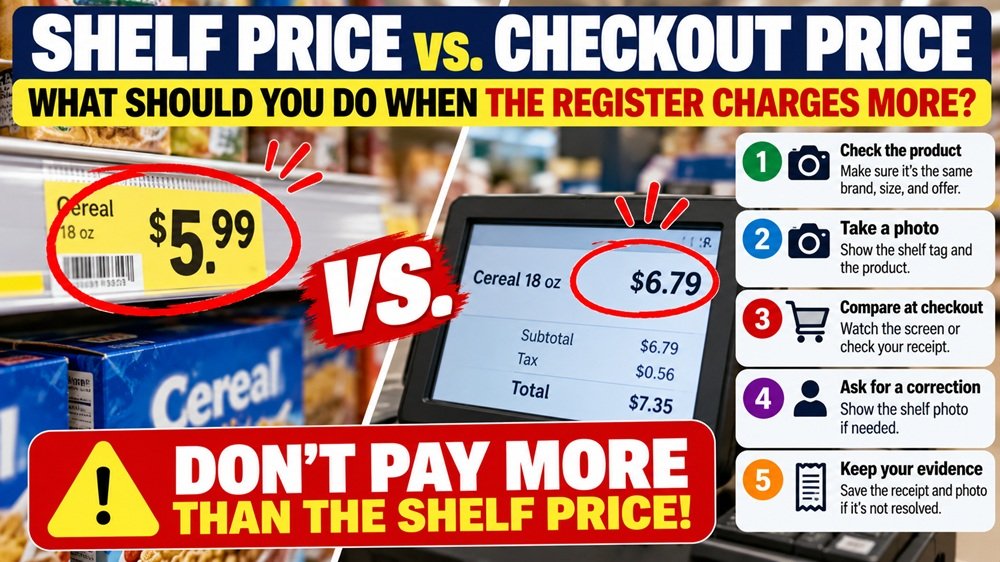
You pick up an item marked $5.99 on the shelf.
At checkout, it rings up at $6.79.
It’s only 80 cents, so you may be tempted to ignore it—especially if there is a line behind you.
But when several items are priced incorrectly, or the same problem happens repeatedly, those small differences can add up.
A new Federal Trade Commission lawsuit against Dollar General has put this everyday shopping problem back in the spotlight. The FTC and 20 states allege that Dollar General repeatedly charged customers more at checkout than prices displayed on shelves, price tags, and advertisements.
The case is still pending, so the allegations have not been finally decided by the court.
For shoppers, however, the larger question is useful regardless of where you shop:
What should you actually do when the shelf price and checkout price don’t match?
First: Don’t assume every price difference is an overcharge
Before challenging the price, take a few seconds to make sure you are comparing the same offer.
Check whether the shelf tag applies to:
- The same brand
- The same size or quantity
- The same flavor or variation
- The same UPC or product description
- A sale that is still active
- A promotion requiring multiple items
- A loyalty-card or app discount
- A digital coupon that must be activated
For example, a sign may say:
“2 for $8 with digital coupon.”
If you buy only one item or did not activate the coupon, the higher checkout price may be correct.
But if the product and conditions match and the register is still charging more, take action before leaving the store.
Step 1: Watch the price while the item is scanned
The easiest price error to fix is the one you catch before the transaction is finished.
At a traditional register, watch the customer display when practical.
At self-checkout, look at each item’s price as it appears on the screen.
If something looks wrong, pause and compare it with what you remember seeing on the shelf.
For a small basket, this is easy. For a large grocery or household-shopping trip, focus especially on:
- Sale items
- Clearance items
- Buy-one-get-one promotions
- Digital coupon items
- Products where the shelf price influenced your decision to buy
Step 2: Take a photo of the shelf tag
If you notice a discrepancy, a photo can save a lot of confusion.
Take a picture showing:
- The shelf price
- The product next to the label
- The item description or SKU if visible
- The promotion terms
- The expiration date, if the sign includes one
Try to capture enough context that someone looking at the photo can tell which product the price belongs to.
A close-up showing only “$4.99” without the product description may not be very useful later.
Step 3: Ask for the correction before you leave
If the checkout price is higher than the displayed price, politely point it out to the cashier or self-checkout attendant.
You can simply say:
“The shelf showed $5.99, but it’s ringing up at $6.79. Could you check the price?”
Many price discrepancies are corrected quickly once an employee verifies the shelf tag.
If necessary, show the photo you just took.
Handling the problem before the transaction ends is usually easier than returning later to dispute an 80-cent or $2 difference.
Step 4: Check your receipt before leaving the parking lot
Some mistakes are difficult to notice while items are being scanned.
Before leaving, look at the receipt—particularly if your purchase included several advertised specials.
Check for:
- An item charged at a higher price
- A promotion that didn’t apply
- A digital coupon that was not deducted
- An item scanned twice
- A quantity discount that did not trigger
If you find a problem, return to customer service with the receipt and, if available, your shelf-price photo.
The sooner you raise the issue, the easier it is to document what happened.
What if the store says, “The computer price is the price”?
Do not assume that is necessarily the end of the matter.
Retail pricing rules exist at both federal and state levels, and individual states can have additional requirements governing price accuracy.
The National Institute of Standards and Technology, or NIST, notes that pricing laws and regulations vary by state. State Weights and Measures agencies are generally responsible for enforcing retail price-verification requirements.
That means the exact remedy can depend on where the purchase occurred.
Some jurisdictions require a retailer to honor certain advertised or posted prices. Others have specific scanner-pricing rules or enforcement procedures.
But there is no safe nationwide rule that says:
“If an item scans incorrectly anywhere in America, you automatically get it free.”
Do not rely on a social-media post claiming that every pricing error entitles you to a free product or a fixed cash payment.
So which price should the store charge?
FTC guidance says truthful-pricing standards apply to price claims, including sale prices and price comparisons.
The FTC also notes that in many jurisdictions businesses are legally required to charge no more than an applicable advertised or shelf price.
But because state laws differ, the precise legal answer and remedy can depend on the state where the transaction occurred.
If you need to know your state’s specific rule, NIST maintains a state-by-state guide to U.S. retail pricing laws and regulations.
What the Dollar General case alleges
On October 26, 2026, the FTC and 20 states filed a lawsuit against Dollar General Corporation.
The complaint alleges that Dollar General repeatedly charged consumers more at checkout than prices displayed on shelves, product tags, and advertisements.
The FTC says the company operates more than 21,000 stores nationwide and alleges that pricing problems affected thousands of locations and resulted in millions of dollars in consumer overcharges.
The agency also says Dollar General received tens of thousands of consumer complaints related to pricing.
Again, these are allegations in a pending lawsuit. The filing of an FTC complaint does not mean the court has already determined that Dollar General violated the law.
Why a 50-cent mistake still matters
A small price difference may not seem worth the trouble.
Suppose your basket has three discrepancies:
Item A: +$0.60
Item B: +$1.20
Item C: +$0.75
That’s already $2.55 on one shopping trip.
If similar mistakes happen repeatedly over months, they can quietly erase the savings you thought you were getting from sales and promotions.
This is especially relevant at stores where shoppers make many small purchases and may be less likely to examine individual prices.
What if you notice the mistake after you get home?
Don’t automatically throw away the receipt.
If the difference is meaningful, keep:
- The receipt
- A photo of the shelf tag if you have one
- The product packaging
- The store location
- The date and approximate time of purchase
Contact the store and ask how it handles pricing corrections.
If the store refuses to address a recurring or clearly documented pricing problem, you can consider contacting the consumer-protection or Weights and Measures authority in your state.
NIST specifically recommends contacting your state’s Weights and Measures authority for complaints involving retail overcharges.
Don’t confuse a pricing mistake with a bait-and-switch claim
Not every incorrect shelf tag means a retailer intentionally tried to deceive you.
Retail prices change frequently, promotions expire, tags can be misplaced, and employees can make mistakes.
The important distinction is what happens when pricing is inaccurate and whether the retailer has reasonable systems to prevent and correct the problem.
For an individual shopper, you generally do not need to determine the retailer’s intent before asking for a price correction.
Your first job is simply to document the displayed price and the amount you were actually charged.
A simple habit can prevent most checkout-price surprises
You do not need to photograph every price tag in the store.
Instead, use a selective approach.
Take a quick photo when:
- The discount is large
- The shelf price is the reason you’re buying the item
- The promotion has complicated conditions
- You’re buying several units
- The product is marked clearance
Then compare those items during checkout.
That 10-second photo can be much more useful than trying to remember exactly what the shelf sign said after the transaction is complete.
The SavingQueen 30-second checkout rule
When a register price looks wrong, use this sequence:
1. Check the product.
Make sure the shelf tag applies to the exact item.
2. Photograph the price.
Include the product description and promotion conditions.
3. Compare at checkout.
Watch the screen or review the receipt.
4. Ask for correction immediately.
Show the shelf photo if necessary.
5. Keep the evidence.
Save the receipt and photo if the problem is not resolved.
6. Check your state rule if necessary.
Retail pricing laws and remedies vary across the United States.
The SavingQueen takeaway
The lesson from the recent Dollar General pricing case is not that shoppers need to become investigators every time they enter a store.
It is that the price on the shelf and the price at checkout are both worth paying attention to.
If a $5.99 product rings up at $6.79:
Don’t argue first. Verify first.
Check that the price applies to the exact product, photograph the shelf tag, ask for a correction, and keep the receipt if the issue is not resolved.
And don’t rely on a universal “scanner law” you saw on social media. Retail pricing rules and consumer remedies vary by state.
For everyday shopping, the simplest money-saving habit may be:
Shelf → Photo → Checkout → Receipt → Correction.
It takes less than a minute—and it helps make sure the discount you thought you were getting is the price you actually pay.